Multi-unit buildings
Building view, adding units as you go, and avoiding false “done” on apartments.
For admins and canvassersOne street address can hide dozens or hundreds of units. If the app treated the whole building as “done” after a single knock, captains would skip floors and teammates would double-knock. DoorLine tracks per unit.
Open Building view
In the canvass list, addresses with two or more unit records show an N units chip. Tap through to Building view.
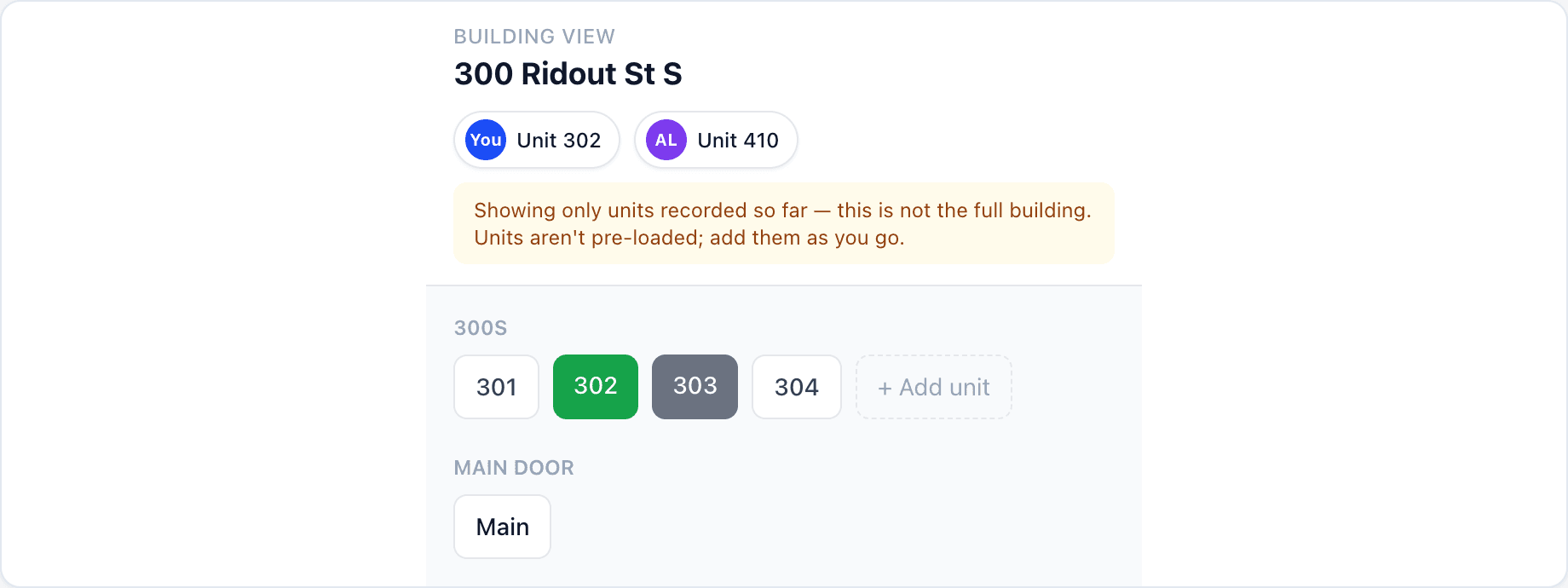
Add units as you go
Tap + Add unit, enter a unit number (for example 302), and record the outcome. DoorLine groups chips heuristically (300s, letter rows, units 1–99). Use Main door for the lobby / buzzer conversation when it is not a specific suite.
Watch for teammate activity
Jump chips show where you or a teammate last worked in the building. The input sheet can warn if someone already knocked the same unit — useful when many people share one high-rise.
Blitz tips
- Split floors verbally (“Alex takes 3rd, Jordan takes 4th”).
- Turf time estimates undercount apartments — plan extra hours.
- Literature-only passes still mark Literature dropped per unit when you can.
Back to field basics: Door knocking.