Lit Drop
Build a sparse door list, split it into driving canvasses, and print walk sheets that import later.
For campaign adminsWhen to use Lit Drop
Lit Drop builds a list of specific doors — a warm list, a donation letter, a “please take a sign” note — even when they are scattered across the ward. The list is the source of truth. A drawn hull would pull in hundreds of extra houses, so we do not use one as membership.
Open Lit Drop
In admin, open Lit Drop (orange New pill in the sidebar). You can add doors three ways, then split and print.
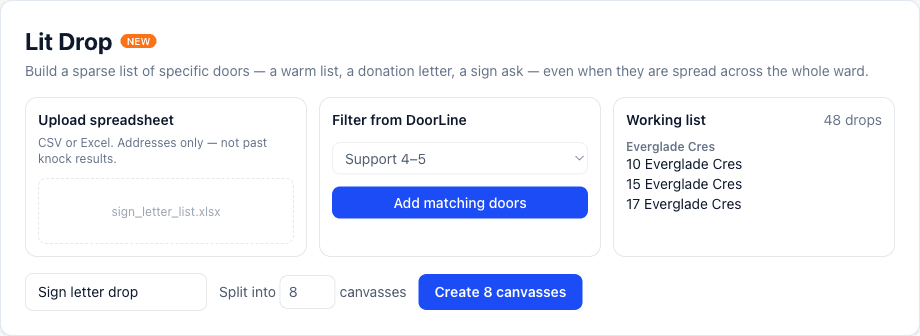
Upload, filter, or click
- Upload a CSV or Excel of addresses — drop the file on the upload card or choose one. A percent bar tracks matching as it reads the sheet. DoorLine matches them to the map without sending the sheet through the paper-import AI.
- Filter doors you already IDed — support 4–5, wants a sign, wants to donate, an issue keyword, a date range.
- Click individual doors on the map, or search. Use clicks for a handful, not 500.
Review matches
Confident matches are added automatically. Rows that still need a decision sort to the top, weakest first. For each one you can pick a candidate, Skip the row, or Search an address if the suggestion is wrong. Court / Ct / Crt are treated as the same suffix. Use Place missing door when the house is not on the map.
Split into N, or no more than N doors
Name the work, optionally pick a time, then choose Split into N (how many lists) or No more than N doors (packs of 50, packs of 100). The map frames your ward, not a default downtown view. Split keeps whole streets together and draws non-overlapping pieces whose dots match the piece color. Asking for N lists keeps N lists, even when each piece is small.
Print a walk sheet
Every canvass — a Lit Drop piece or a normal turf knock — has Print sheet (tiny orange New on the button). The paper list is in the same street order as the app.
- Page 1 is the canvass name, date, door count, and a full-page map of that piece.
- Every address page has a small map top-right, then result (C / NH / Lit), support 1–5, Sign / Vol / Don, and notes.
- The footer on every page asks crews to return filled sheets so they can be uploaded to DoorLine. Every interaction counts.
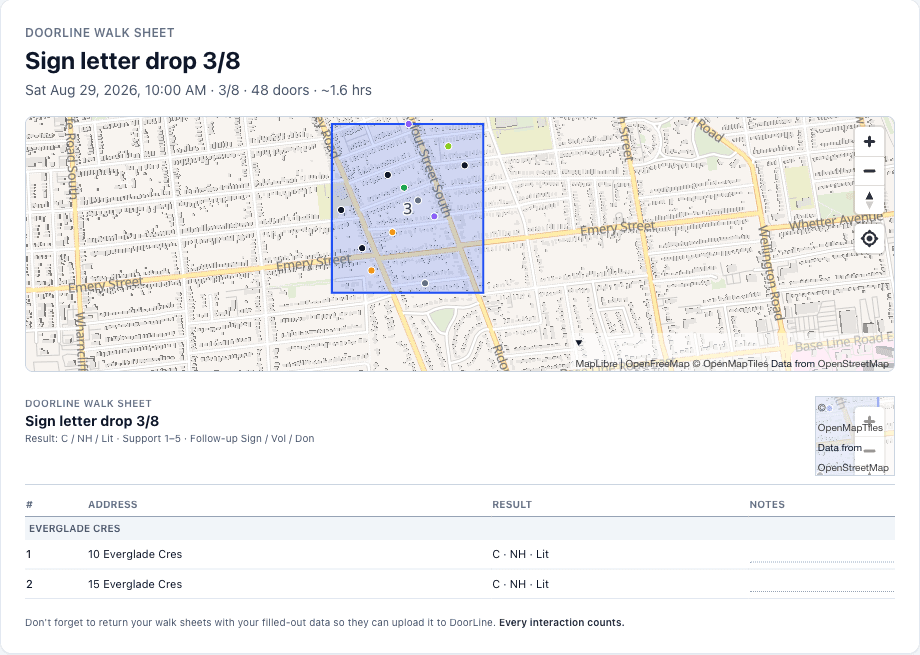
When paper crews are done, photograph the sheets in Manual Input. The printed legend matches what the importer already reads. In the app, mark Literature dropped at each door.
How this differs from Manual Input
Lit Drop builds a future list of doors to visit. Manual Input imports past knock results from a photo or spreadsheet. Do not upload a sign/letter list in Manual Input — that would record history that has not happened yet.